
Lesson 2 — Your Driver's Clock
The test below stays in English. You must pass the test in English.
Lesson 2 — Your Driver's Clock
The clock you don't check is the clock the driver inherits.
Why this matters
Lesson 1 was the 5 rules. This lesson is the 4 numbers — the four clocks that tell you whether THIS driver can take THIS load right now.
The thesis applied to clocks: the clock you do not check is the clock the driver inherits. Every minute a driver is on duty, the clock changes. If you assign without looking, you are betting the driver's day, their CDL, and the carrier's CSA score on the hope that the math works out.
Under 49 CFR § 390.6, asking a driver to take a load that does not fit their clocks is federal coercion. The clocks are the data that lets you avoid this. They are visible to you in real time in any modern ELD portal — Motive, Samsara, KeepTruckin/Motive, Omnitracs, Geotab, Trimble. Two minutes per check.
The four clocks you check
For every driver, every time, before every assignment:
1. Driving hours remaining today. Out of 11 max. Example: "Driver has 4 driving hours left."
Connect: this is the simplest number. If the load needs more driving hours than the driver has, you do not assign it to this driver.
2. Duty hours remaining today (the 14-hour window). Out of 14 max. Example: "Driver has 6 duty hours left in the window."
Connect: duty hours are eaten by everything — fueling, dock waits, detention, traffic. If the load needs 4 driving hours but the route will include 3 hours of foreseeable delay, the driver needs 7 duty hours, not 4.
3. Weekly hours remaining (60/70 cycle). Out of 60 (in 7 days) or 70 (in 8 days). Example: "Driver has 22 hours left this week."
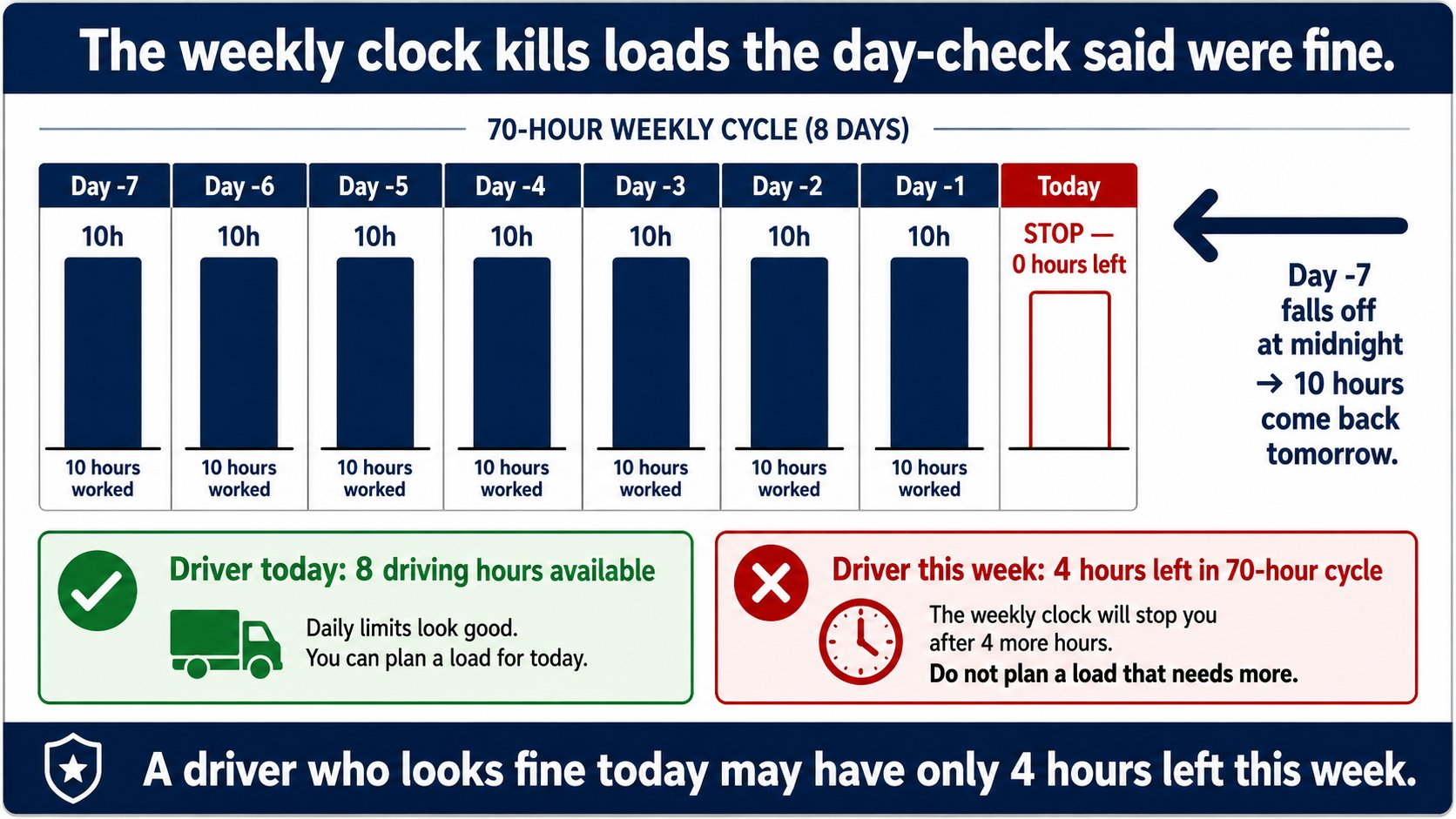
Connect: this is the clock dispatchers miss most. A driver who looks fine for today may have only 4 hours of weekly time left. The weekly clock kills loads that day-checks said were fine.
4. 30-minute break status. Has the driver taken their required 30-minute break yet today? When does the next one come due?
Connect: if the driver is at hour 7 of driving and your load needs 4 more, the break has to happen during this trip. That is a duty-hour math fact you need to account for. Where, when, and how the driver takes the break is the driver's call — they know their truck, the route, and where they can safely stop. Dispatch's job is the math, not the parking spot.
Image 1 — Inside the ELD portal
[Infographic placeholder — 4 HOS clocks diagram]
The math: does the load fit?
Example load: 350 miles, expected drive time 7 hours, 1 hour of foreseeable rush-hour delay, 2-hour customer detention typical.
Real duty time needed: 7 + 1 + 2 = 10 duty hours. Driving hours needed: 7. The 30-minute break also has to fit — the driver will place it where it works.
If the driver's clocks show:
- 10 driving hours left, 12 duty hours left, 30+ weekly hours left, break not yet taken — load fits. Assign.
- 7 driving hours left, 10 duty hours left, 30+ weekly hours left, break not yet taken — load barely fits, no margin. Risky. Better to use a different driver if you have one.
- 6 driving hours left — load does NOT fit. Driver cannot complete in one duty period. Do not assign.
What happens when you skip the check
You assign a load to a driver whose weekly clock you did not check. The driver picks up, hits the road, and 4 hours in, their weekly clock runs out. The truck stops. The driver parks. The load sits.
Customer is angry. Recovery driver has to be sent. Carrier ate the cost. Driver ate the day. You missed the check that takes 2 minutes.
What you do as a dispatcher
- Open the ELD portal before EVERY assignment. Not the dispatch board. The ELD portal that shows live HOS data.
- Read all 4 numbers. Not just driving hours. All four.
- Add the foreseeable delays (rush hour, detention, mountain passes) to the load's duty-hour requirement before you compare.
- If the load does not fit, do not assign it to this driver. Find another driver with the right clock, or reschedule.
The thesis, restated
The clock you do not check is the clock the driver inherits. The driver inherits your math errors as their day, their MVR, and their CDL exposure. The carrier inherits them as CSA score. Check the four clocks. Every driver. Every load. Every time.
Next step
Take the short quiz below. 5 questions in English. You need 4 of 5 correct to pass.
Image 2 — Why the weekly clock matters
📋 Sample Quiz Questions (Preview)
These are the questions on the quiz at the end of this lesson. The actual quiz is taken after logging in. Correct answer marked with ✓.
- ○ One — just the driving hours remaining
- ○ Two — driving hours and duty hours
- ✓ Four — driving hours remaining, duty hours remaining (14-hour window), weekly hours remaining, and 30-minute break status
- ○ None — the driver knows their own clock
- ○ Driving hours remaining today
- ○ Duty hours remaining today
- ✓ Weekly hours remaining (60/70 cycle) — a driver who looks fine today may have only 4 hours left this week
- ○ The 30-minute break clock
- ○ Call the driver and ask them
- ○ Check the dispatch board
- ✓ The ELD back-office portal (Motive, Samsara, Omnitracs, Geotab, Trimble) — live data, updated every minute
- ○ Ask the safety department
- ○ 7 hours — only driving time counts
- ○ 8 hours — add 1 for the break
- ✓ 10 hours — drive 7 + rush 1 + detention 2 — all eat the 14-hour duty clock
- ○ It depends on the driver
- ○ Dispatch and hope the customer is flexible
- ○ Tell the driver to extend the day "just this once"
- ✓ Do not assign to this driver — find a driver with the right clock, reschedule the appointment, or decline the load
- ○ Have the driver take a 30-minute break to reset the clock
End of preview. The actual quiz requires login to record a grade.